How to Sync eBay and Shopify Inventory Without Overselling (2026 Guide)

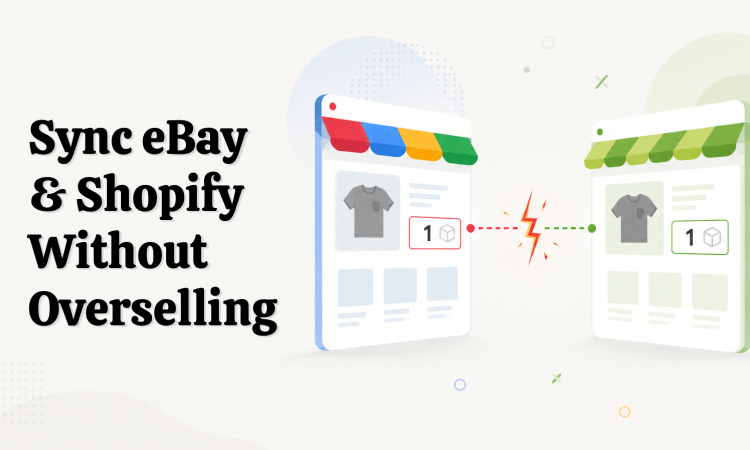
Connecting eBay to Shopify isn’t usually the hard part. The hard part is what happens afterward.
Your eBay listing says 1. Shopify says 1. Then someone buys that last unit on eBay. A minute later — before the new quantity reaches Shopify — another customer buys it there too.
Now you have two paid orders and one product.
That’s the moment “inventory sync” stops being a technical feature and turns into a customer-service problem. This guide is about why that gap opens up, how to keep it as small as possible, and what to do on the days it opens anyway. If you’ve ever canceled an eBay order because the item already sold on Shopify, you know exactly the problem I mean.
Jump to:
- Why eBay and Shopify inventory gets out of sync
- Pick which system owns your inventory
- Get your inventory locations right
- Two-way inventory, master-driven everything else
- Handling orders, cancellations, and returns
- Safety stock
- eBay inventory not syncing? A troubleshooting checklist
- Do you even need an inventory app?
- What to look for in a sync app
How overselling actually happens
It rarely feels like a failure. It feels like a few minutes where your two stores quietly disagree about what’s in stock.
Here’s the sequence, minute by minute:
- 10:12 — Your last unit sells on eBay. eBay’s quantity drops to 0.
- 10:12–10:22 — That update has to travel: eBay to your sync system to Shopify. For those couple of minutes, Shopify still shows the item in stock.
- 10:22 — A Shopify shopper buys the same unit. You now have two paid orders for one item.
- Later — you cancel one of the two orders. If it’s the eBay one, that cancellation is the transaction defect.
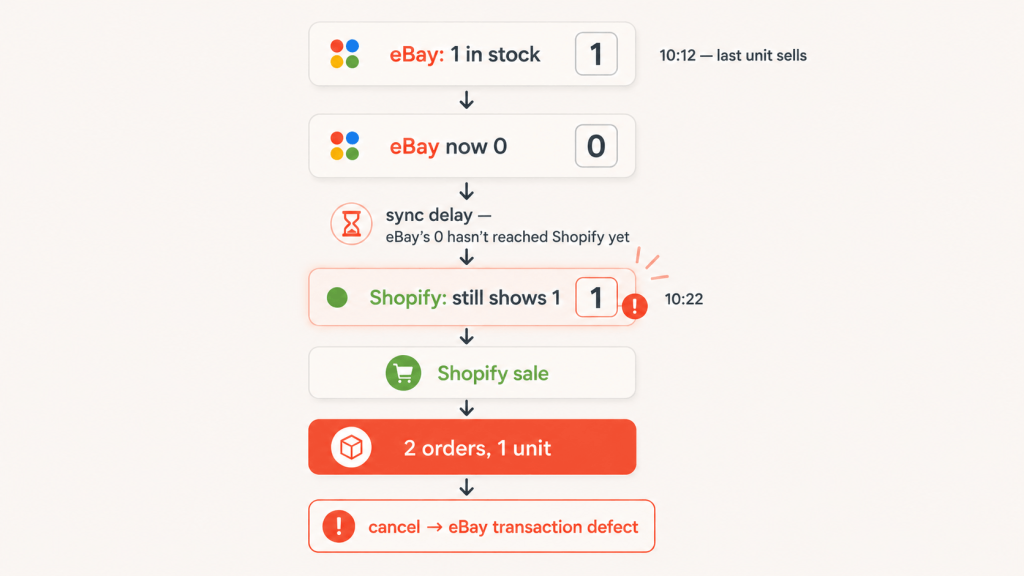
That cancellation is where it costs you. On eBay, cancelling because an item is out of stock or sold elsewhere counts as a transaction defect. Rack up enough of them and your account can drop Below Standard, which brings selling limits and higher final value fees.
So the price of one oversell isn’t a single refunded order. It’s the unit, the two storefronts that both showed it available, the two customers who bought it, the cancellation, and a mark on your seller record that takes weeks of clean selling to work off.
Everything below is aimed at two things: shrinking that 10:12-to-10:15 gap, and surviving the moments you can’t shrink it to zero.
What a sync tool is actually doing
Before any of the fixes make sense, one idea has to land: a sync tool doesn’t create inventory. It moves inventory changes from one system to another.
Which means one system, somewhere, has to be the authority on how many units you really have. Everything else takes its cue from that system. People call this the source of truth, and picking it on purpose is the most important decision you’ll make in a multi-channel setup. It gets its own section in a minute. For now, just hold onto the idea, because nearly every problem below comes down to the same question: which system said what, and when?
Why eBay and Shopify inventory gets out of sync
You can have eBay and Shopify connected and still have the wrong stock showing on one of them. The connection itself isn’t the hard part. Keeping the numbers right is. Here are the six things that pull them apart.
1. No reliable link between the two listings — the big one
For a sync to work, the tool needs a dependable way to know that a specific eBay listing and a specific Shopify product are the same item. Many tools use the SKU for this. That’s where a lot of them run into trouble, because eBay doesn’t even require a SKU — you can list without one — so the tool is often matching on an identifier that’s missing, or mismatched in ways you’d never notice:
Shopify SKU:TS-100-BLK-M
eBay SKU:TS100-BLK-M
Close enough to a human. Not the same identifier to a matching system. When the SKUs don’t line up — or one side has none at all — the tool can’t connect the two, and the update quietly gets skipped.
This is one reason our eBay Integration app links each eBay listing to its Shopify product directly when you connect them, rather than relying on SKUs matching — so a missing or mismatched SKU doesn’t break the sync.
2. Variations that map to the wrong thing
This one bites hardest on eBay’s multi-variation listings, and it’s sneakier than a broken link, because the sync can look like it’s working when it isn’t.
A product isn’t always a tidy single item with one quantity. Anything with size, color, or style is really a listing with variations underneath it, and eBay tracks quantity down at that variation level. So a mismatch can hide inside a single product — the product is linked, but a variation underneath it is out of step:
Shopify
T-Shirt / Red / Small → 2
T-Shirt / Red / Medium → 0

eBay
Red / Small → 2
Red / Medium → 1
The product says “synced.” Red/Small even lines up. But Red/Medium is wrong — Shopify has none, eBay is still offering one — and that’s the variant that’ll oversell. A healthy-looking product can be hiding a broken variation underneath.
A good integration maps these variations automatically when it first imports the listing, which is when they’re most likely to line up correctly. The time to spot-check is later — after you add a new variation, remove one, or restructure a listing’s options. That’s when a variation can end up unmapped or pointing at the wrong counterpart, so it’s worth a quick look whenever you change a listing’s variations.
3. The wrong warehouse feeding eBay
Run more than one Shopify location and you have to tell the sync which one’s stock feeds eBay. Get it wrong and you end up with a number that’s right on paper and wrong in practice.
Warehouse A: 10 units — ships your eBay orders
Warehouse B: 20 units — retail and everything else
Your Shopify storefront can pull from both: 30 units. eBay only ever ships from Warehouse A’s 10.
Push the combined 30 to eBay and eBay will happily sell 30 units it can’t ship from its own supply. “30 available” is true about your business and false about what eBay can actually fulfill. Point the eBay channel at only the location — or locations — that ship eBay orders.
4. The update that didn’t go through
Nothing syncs truly instantly, and updates don’t always land on the first try. A good tool sends updates when something changes and retries the ones that fail. But retries take time, and time is where drift lives.
It looks like this:
- 10:12:00 — A Shopify order takes quantity from 2 to 1. The tool queues an update for eBay.
- 10:12:01 — The eBay update times out and goes into the retry queue.
- 10:12:30 — eBay still shows the old count; the retry hasn’t cleared.
- 10:12:45 — A second eBay order lands against that stale number.
Nothing was set up wrong. The sync was just mid-retry when a sale came in. Speed matters here. So does visibility: if an update fails, you want to know whether it was rejected, retried, or never sent at all.
5. Sync that only runs one way
Some tools only push inventory in a single direction — say, Shopify to eBay. A Shopify sale reduces eBay stock, but an eBay sale never flows back, so the channel you actually sell on quietly drifts. This is worth checking before you commit to any tool: inventory needs to move both ways, or one side is always wrong. A proper two-way setup, where a sale on either channel updates the other, avoids this entirely.
6. Two apps fighting over the same inventory
This is the one sellers almost never see coming. When two systems can both write to the same inventory, they overwrite each other, and the count starts bouncing around on its own.
It usually looks like this:
Shopify → Marketplace Connect → eBay and at the same time Shopify → a second eBay connector → eBay
Or a longer chain:
Shopify → an inventory app → a warehouse system → eBay
Now you don’t have one source of truth. You have two, each “correcting” what the other just did. Shopify’s own advice is to keep a single marketplace connector app running, precisely to avoid this.
Here’s the pattern that gives it away. Stock is correct all day, then wrong every morning — right at close, off by open, same story daily. Often it’s an old inventory app nobody remembers connecting, running a scheduled overnight push that stamps its own numbers back over everything else while you sleep. If your counts move with no sale to explain them, the culprit usually isn’t the sync you’re watching. It’s the one you forgot you had.
Pick which system owns your inventory
Since a sync tool only moves inventory around, you have to decide which system owns it. Three answers are common, and each gives you a clean flow:
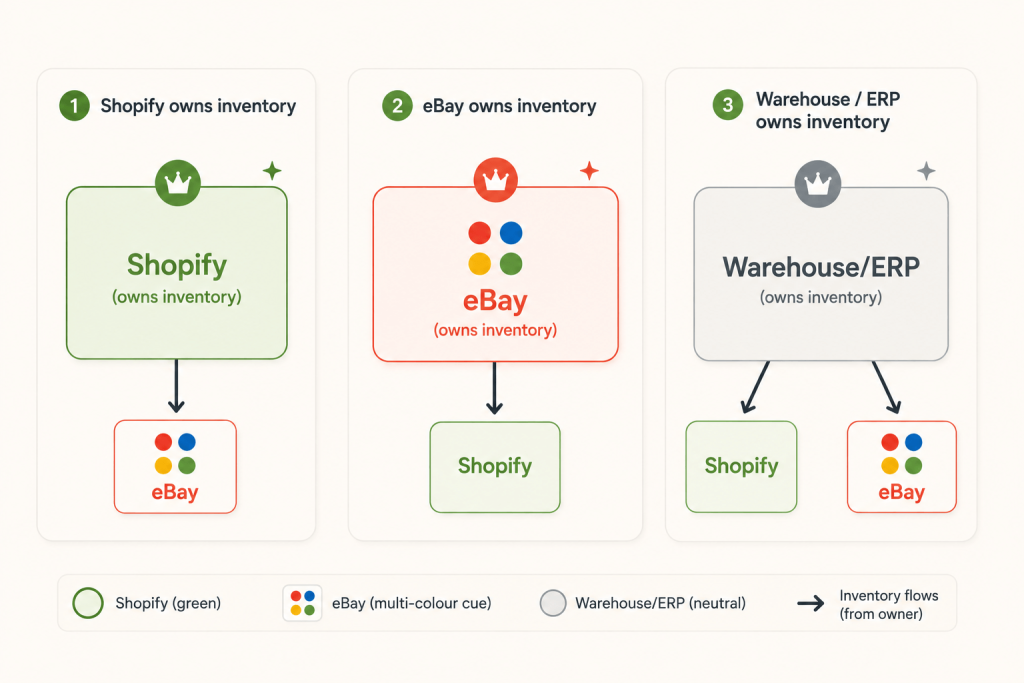
Shopify owns inventory
eBay sale → eBay order imported into Shopify → Shopify inventory drops
→ new quantity pushed back out to eBay
eBay owns inventory
Shopify sale → Shopify inventory drops → new quantity pushed to eBay
A warehouse or ERP owns inventory
eBay sale + Shopify sale → both land in the central system
→ central system works out true available stock
→ correct quantity pushed back to BOTH channels
The rule: one system should own the inventory decision. Everything else should sync to it.
None of the three is universally right. But there’s a wrong move, and it’s not choosing — leaving two systems each convinced they’re in charge.
If I were setting this up for a store today, I’d make eBay the source of truth unless a warehouse or ERP system already owns inventory. Then I’d connect one channel, run a couple of test orders, and only turn on the rest once I could see it working. Decide the owner first and every setting after it gets easier.
Get your inventory locations right
One Shopify location? Skip ahead. Several? This isn’t a fringe case — it’s part of the plumbing. Connectors let you choose which location supplies marketplace stock precisely because it changes the numbers.
The rule is simple. Point eBay at only the warehouse — or warehouses — that actually ship eBay orders. Don’t push your company-wide total unless every one of those locations ships eBay orders. If you need the reasoning, look back at Warehouse A and B: selling stock eBay can’t reach is just overselling by another route.
eBay’s out-of-stock option, and what happens at zero
What eBay does when a quantity hits zero is a choice you should make on purpose, because the behavior flips completely on one setting.
With the option off, the listing ends when quantity reaches zero. With it on, an eligible Good ‘Til Canceled listing stays active but is hidden from search until you add inventory again. That preserves the existing listing instead of forcing you to create a new one every time you restock — so you keep the listing rather than starting over.
For many sellers syncing inventory with Shopify, it’s worth enabling. (One footnote: eBay will end the listing anyway if it sits at zero for 180 days straight.)
For variations, ask your connector a few things before you trust it:
- Does each variation sync its own quantity independently?
- When one variation hits zero, does that variation hide while the others stay live?
- Are Shopify variants mapped correctly to eBay variations?
- What happens when you add a variation later, or change one?
Variations are where “looks synced” and “is synced” drift apart most often.
Two-way inventory, master-driven everything else
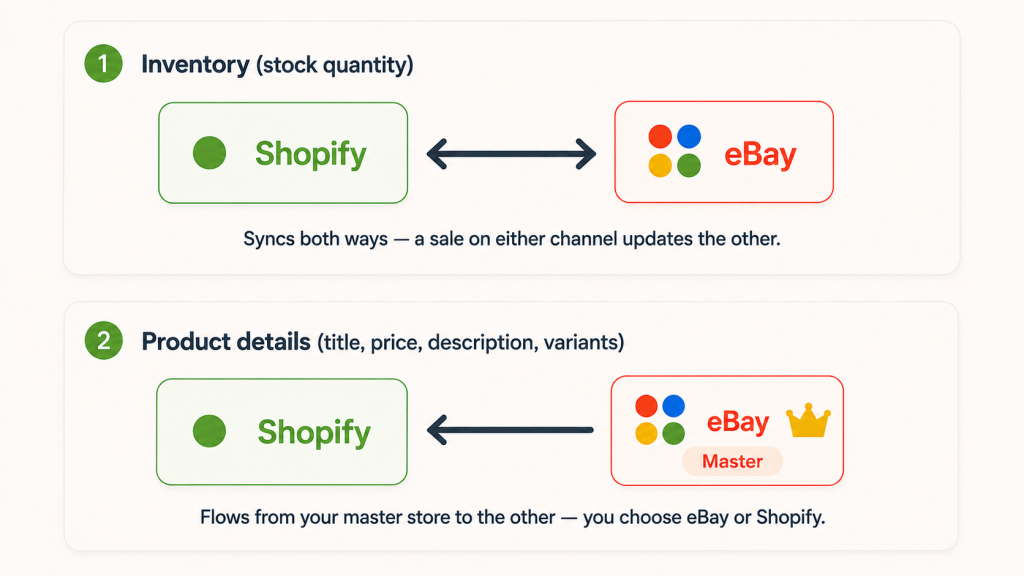
When people shop for a sync tool, they fixate on which direction things flow. For inventory, that’s the wrong worry — with a proper setup, stock moves both ways no matter what.
A sale on eBay reduces your quantity on both eBay and Shopify. A sale on Shopify reduces it on both. This happens in both directions, every time, whichever store you’ve set as master — and it’s exactly what protects you from the overselling scenario at the top of this guide. Neither channel is left showing stock it no longer has.
The master store, and what it controls
Product details work differently, and this is where the “master store” choice comes in. You pick one store as the master — eBay or Shopify. Titles, descriptions, prices, variants, and any quantity you change by hand flow from the master out to the other store. You maintain your listings in one place, and the other side follows.
Set eBay as master and you manage everything on eBay. Set Shopify as master and it’s the reverse.
Sales are the exception — and it’s the important one
When an actual order comes in on either channel, the quantity drops on both — master or not. A customer buying on the follower store still reduces the master’s stock. So you’re protected from overselling in both directions; it’s the manual edits and product details that follow the master.
One practical habit that saves you trouble: if you restock or adjust a quantity by hand, do it on your master store. Sales sync both ways automatically, but manual changes flow master-to-follower — so the master is where you want to make them.
Orders, in one place
Orders work with you too. eBay orders can flow into Shopify and be managed there, so you’re not bouncing between two dashboards to fulfil.
Two-way doesn’t mean instant
Here’s the catch worth slowing down for.
Two-way describes direction — a sale on either channel updates the other. Real-time describes how quickly that change is detected and pushed. Neither one guarantees it reaches the other channel before the next sale does.
Real-time, event-driven sync can make that window very small. It can’t close it completely, though — not in the case where two channels sell the last unit at almost the same instant.
Available: 1
10:00:00.001 → eBay accepts an order for the last unit
10:00:00.002 → Shopify accepts an order for the same unit
Both channels accepted the order against the quantity they believed was available, before the other channel’s sale had reached them. Once both have accepted that last-unit order, sync can correct the inventory going forward — but it can’t reach back and make one of those two orders disappear.
So the honest position: real-time, two-way inventory sync sharply reduces overselling. It doesn’t rule it out completely. That’s why safety stock still earns its place. Any tool that promises you’ll never oversell is promising something the systems underneath it can’t deliver.
Handling orders, cancellations, and returns
Syncing the quantity number alone won’t cut it. The events that change how much you have available all need handling, and they don’t behave the same way:
- An eBay order → Shopify inventory should go down.
- A cancellation → the unit may become available again, so inventory can go up.
- A return → inventory might come back — but only if you actually restock the item.
That last one trips people up. A refund doesn’t automatically mean “add one back to stock.” A returned item might get restocked, or it might be damaged, lost, sent back to the supplier, or otherwise unsellable.
This isn’t a fringe view, either. Shopify’s own Marketplace Connect handles a canceled or returned order by updating the order but not automatically restocking the inventory — on purpose, to avoid overselling — and leaves it to you to add the unit back if you actually got it back. Good instinct to copy: treat “money refunded” and “unit back on the shelf” as two separate events, because they often are.
So the real requirement isn’t “sync the quantity.” It’s making sure your integration handles every inventory-changing event — orders, cancellations, returns, fulfillment — with the right logic for each.
Safety stock
Since some drift window always exists, the practical defense is to sell slightly fewer units than you physically hold. That buffer absorbs the seconds or minutes while counts catch up.
A simple way to think about what’s actually sellable:
Sellable = physical inventory − reserved inventory − safety stock
Physical stock: 20, Reserved (open orders): 2, Safety stock (buffer): 3, Sellable = 15
How big your buffer should be depends on a few things:
- How fast the item sells — fast movers need more cushion
- How many channels share it — more channels, more chance of two sales at once
- How reliable your sync is — a flaky one needs a bigger buffer
- What a stockout costs you — how much does a missed sale hurt versus a cancellation?
- Whether the stock is also sold offline or in a shop the sync can’t see
Bigger buffers cut overselling but leave stock sitting unsold. Smaller buffers sell more but risk cancellations. Set it per product, based on how fast it moves and how much a mistake costs you.
eBay inventory not syncing? A troubleshooting checklist
When counts drift, don’t fix listings one at a time, and don’t check fourteen things at once. Take a single product and trace it end to end until you find where it breaks.
Start with these five. Most problems are here:
- Is the product actually linked between eBay and Shopify?
- Is the link still intact — or was the listing relisted, recreated, or re-imported, which can break it?
- Is the right warehouse feeding eBay?
- Is the right variation mapped — the variant, not just the parent product?
- Is another app also changing this inventory?
If those check out, work through the less common causes:
- Was the eBay listing ended and relisted, creating a new listing your app isn’t linked to yet?
- Is the product linked to an old or duplicate eBay listing instead of the current one?
- Is the right eBay listing linked, not an old duplicate?
- Is inventory tracking switched on for the Shopify product?
- Did the sync actually fail, or is it just delayed and retrying?
- Is there an error log, and what does it say for this SKU?
- Did an order, refund, or return fail to import and leave the count stale?
- Was inventory changed by hand on eBay, outside the sync?
- Was the Shopify product or variant recently edited in a way that broke the link?
Start with the connector’s own log rather than Shopify’s admin. Shopify’s admin may not tell you why a third-party connector failed to update eBay, so the connector’s logs are usually the better place to begin. The log is what tells you whether an update was rejected, retried, or never attempted.
Here’s a common one that isn’t really a “sync failure” at all: your warehouse has 7 units, Shopify says 7, and someone bumps eBay to 10 by hand because they know a shipment lands tomorrow. The next time Shopify sends its own quantity, that manual change gets overwritten — and it looks like the app “lost” the number. It didn’t. Two sources disagreed, and the owner won.
Do you even need an inventory app?
If you have 20 slow-moving products and sell only on eBay, you may not need one at all. If you have 20 fast-moving products shared between Shopify and eBay, you may need one badly. The trigger isn’t a magic SKU count — it’s how often, and how many ways, your inventory changes.
You’ve probably outgrown doing it by hand when:
- You sell on two or more channels
- Inventory changes several times a day
- You sell low-stock items, where a single oversell stings
- More than one person edits inventory
There’s no universal “automate at 50 SKUs.” A seller with 30 fast movers across three channels needs it more than one with 500 slow movers on a single channel. And I’ll say it plainly: if you sell the same stock on eBay and Shopify, I wouldn’t manage quantities by hand for long. It’s too easy for one forgotten update to turn into a customer-service problem.
What to look for in a sync app
If you decide it’s worth automating, judge tools on how they handle the failures above, not on the adjectives in their marketing. Questions that actually separate them:
- Does it sync both ways? A sale on either channel should update the other.
- How does it handle orders, cancellations, and returns? Not just the quantity number — the events, with sensible restock logic.
- Can I choose which warehouse supplies eBay? (The technical term is location scoping, but that’s the question underneath it.)
- Does it match variations, not just products? And does it tell you when it can’t?
- Can it handle more than one eBay account, if you run several?
- What actually triggers an update — webhooks, events, or a timer? Don’t just accept the word “real-time.” Ask how quickly a change is actually detected and pushed.
- Can I see failures? Failed products, rejected updates, retry status, last successful sync.
- What happens when the numbers disagree? If Shopify says 4 and eBay says 2, which number does the app trust — and can you set that rule?
Whichever tool you pick: I wouldn’t trust any sync setup I hadn’t tested with a real order first. Turn it on for one product, buy it on eBay, watch it drop on Shopify, then scale up. That five-minute test catches more problems than an hour of reading settings.
FAQ
Q. Why is my eBay inventory not syncing with Shopify?
A. Most often a SKU mismatch, a mis-mapped variation, or a second app overwriting your counts. Trace one product through the checklist above to find which.
Q. Do my SKUs have to be identical on eBay and Shopify?
A. You set your own SKUs, but the sync needs one reliable identifier pointing at the same unit on both sides. In practice that means matching them exactly — case and spacing included.
Q. Can I completely prevent overselling?
A. You can cut the risk hard with two-way, real-time sync plus a safety-stock buffer. But no sync can rule out the rare case where two channels sell the last unit in the same instant. Safety stock is your cover for that gap.
When you’d rather not do all this by hand
Handling every piece of this yourself — clean SKUs, the right warehouse feeding eBay, two-way order handling, variation mapping, watching the error log — is doable when you’re small and genuinely wearing as you grow.
If you’d rather it ran itself, InfoShore’s eBay Integration app is built around two-way inventory and order sync between Shopify and eBay: changes flow both ways, orders and stock stay lined up, and it works whether you run your products mainly on eBay or mainly on Shopify. It also handles the initial catalog import, so you’re not copying products across by hand to begin with. Plans start at $19.99/month.
It won’t make overselling mathematically impossible — nothing can — but paired with clean SKUs and a sensible safety-stock buffer, it significantly reduces the gap that turns one unit into two orders and a transaction defect.


[…] counts drift, how to prevent it, and what to look for in a sync setup — i wrote it up separately: how to sync eBay and Shopify inventory without overselling. That’s the piece to read once your catalog is across and you’re selling on […]